
Outages are inevitable. A fragmented customer experience is not.
When systems degrade or dependencies fail, your applications determine whether users stay confident or panic. Coordinated operational state protects customer trust and eliminates the emergency scramble.
Report customers detect degradation or outages first
End users frequently hit broken checkouts or failing workflows before incident teams can coordinate or communicate operational state across applications.
Report increased demand for customer support during downtime
Silent failures and uncommunicated degradation leave users confused, triggering avoidable support ticket surges that in-app state messaging directly prevents.
Cite customer loss as a direct consequence of downtime
Disruptions erode trust when applications fail unpredictably. Transparent runtime messaging and graceful degradation protect customer retention during incidents.
Average enterprise cost of unplanned downtime
While financial impact varies by organization, every uncoordinated minute of disruption compounds lost revenue, engineering firefighting, and recovery overhead.
Source: Cisco & Splunk Research, The $600 Billion Wake-up Call (Survey of 2,000 Global 2000 technology leaders with Oxford Economics)
While Engineers Fix the Problem, What Do Applications Tell Your Users?
An incident is being managed. But are your customer-facing applications responding to keep customers confident?
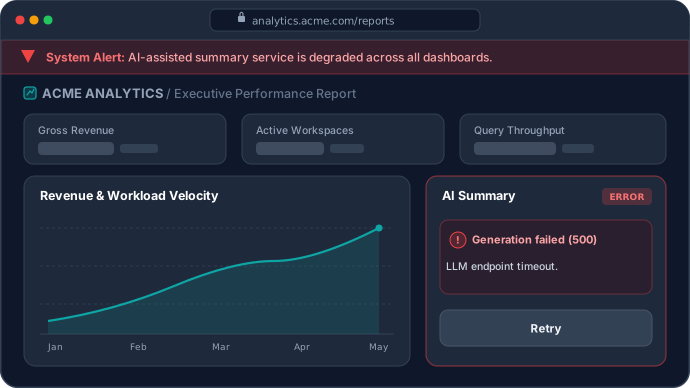
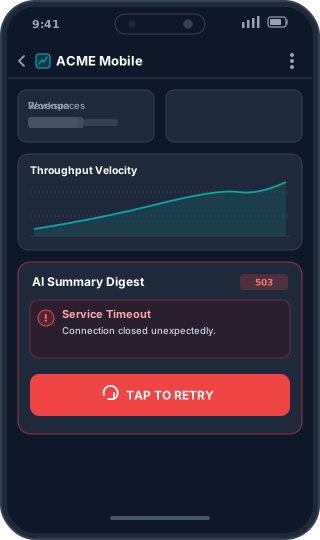
Why Operational States Fragment Across Applications
When incidents strike, teams scramble across disconnected tools, feature flags, and custom implementations to control customer experiences.
Buried in Feature Flags
Operational states are often implemented through feature flags, custom code, and disconnected workflows meant for feature releases, increasing complexity and risk.
Inconsistent Implementations
Different teams and projects build custom status toggles or notification banners, leading to fragmented operational tooling.
No Centralized Control
Teams lack a single control layer to see and govern which applications are operating under outage, degraded, or maintenance states.
Inconsistent Operational Behavior
Customers get mismatching messages and behaviors across API endpoints, mobile applications, and web frontends, eroding trust during critical events.
Team Dependencies
Changing operational behavior requires finding code owners or pushing emergency code deploys, wasting valuable time during an incident.
Fragmented Coordination
Updating banners, schedules, and active outage flags requires orchestrating across Slack channels, CMS platforms, and custom scripts.
RuntimeHQ sits between your incident workflow and your applications
Your monitoring detects anomalies. Your on-call team assesses impact. The moment an incident is declared on RuntimeHQ, every connected application receives the computed operational state-instantly, without redeployment.
Operational Control Flow
Monitoring & Observability
e.g. Datadog, Splunk, Elastic
Internal Alerts
e.g. PagerDuty, Opsgenie
Impact Assessment
On-call team
RuntimeHQ
Declare · Resolve · Propagate
Application Response
Web · Mobile · APIs
“Monitoring tells you something is wrong. RuntimeHQ coordinates how applications respond.”
From Declaration to Client Application Response
Declare state once through human operators or automated webhooks. RuntimeHQ computes and propagates effective state so each connected application adapts deterministically.
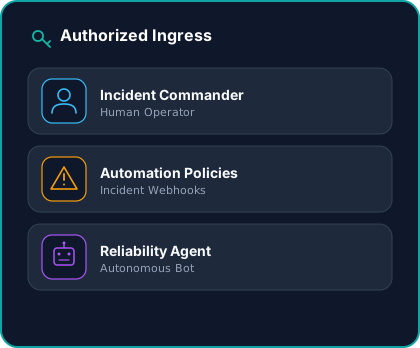
Authorized Ingress
Trigger state changes via incident responders, monitoring webhooks (PagerDuty, Datadog), or automated bots into a governed, audit-logged ingress API.
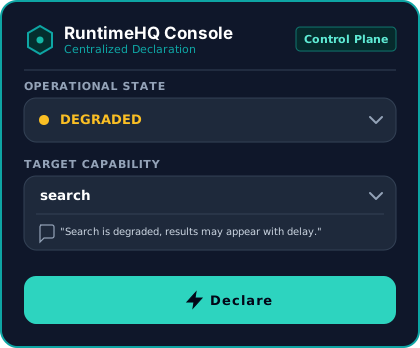
Centralized Declaration
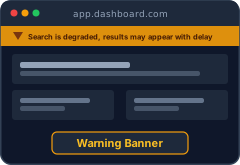
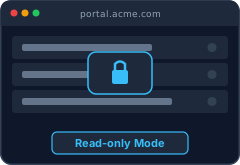
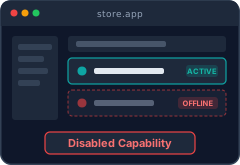
Declare operational state (Degraded, Outage, Maintenance) and affected capabilities once. RuntimeHQ computes effective state payloads and distributes them globally out-of-band.
Client Adaptations
Connected web, mobile, and backend applications synchronize state payloads in memory and adapt behavior deterministically - without hotfixes, redeployments, or critical-path blocking.
Built strictly for operational readiness
No marketing clutter. Just pure operational pillars constructed to safeguard reliability when things break.
Multi-App Targeting
Declare an operational state change once and propagate it consistently across all connected web, mobile, and API surfaces.
Centralized Activation
A single control plane to activate operational states and customer guidance without coordinating across disparate tools.
Zero-Code Updates
Toggle outage modes, maintenance banners, and runtime copy with one click, no code changes or redeployments required.
Live Visibility
A unified live view showing exactly which operational states and customer messages are active across every application.
Scheduled Windows
Pre-schedule maintenance windows to automatically activate notices and coordinate application states without manual intervention.
A unified operational layer for your entire team
From everyday engineering to live incident response, RuntimeHQ coordinates how applications behave so your team never scrambles during downtime.
Engineering Leaders & Founders
Protect customer trust, app ratings, and user retention during incidents. Eliminate the stressful loop of emergency code deploys just to update status.
Incident Responders & On-Call
Gain live command surfaces to toggle operational states and pre-approved customer messaging in seconds, without waiting for code reviews or deployments.
Frontend & Product Engineers
Integrate simple SDK hooks once during peacetime. When operational states change, your applications adapt automatically without brittle custom toggles.
Platform & Infrastructure Teams
Standardize operational state across web, mobile, APIs, and backend services with out-of-band edge distribution, isolated failure domains, and audit trails.
See RuntimeHQ in Action
A 3-minute walkthrough of how RuntimeHQ helps applications respond consistently during outages, degraded service, and maintenance events.
RuntimeHQ is not a feature flag platform, status page, or observability system.
We do not track metrics, monitor clusters, or generate marketing copy. RuntimeHQ is operational state infrastructure purpose-built specifically for outages, degraded states, and planned maintenance coordination in customer-facing applications.
Frequently Asked Questions
Clear answers about operational state propagation, integrations, and application behavior.
What is RuntimeHQ?
How is RuntimeHQ different from feature flags?
How do applications consume operational state from RuntimeHQ?
Can RuntimeHQ update application behavior without redeployment?
Who is RuntimeHQ built for?
Does RuntimeHQ replace a status page?
Does RuntimeHQ sit in the critical request path?
Can RuntimeHQ manage scheduled maintenance windows?
Establish a Single Source of Operational State
Keep your customers confident and eliminate fragmented operational workflows across your applications during outages, degraded service, and maintenance events.
Book a Walkthrough
Discuss your architecture and integration directly with the engineers building RuntimeHQ. No sales reps or qualification decks.
Pick a Time