How Operational State Flows from Assessment to Running Code
Trace how operational intent moves through strictly owned architectural boundaries. RuntimeHQ tells applications what condition they are in; applications decide what to do about it.
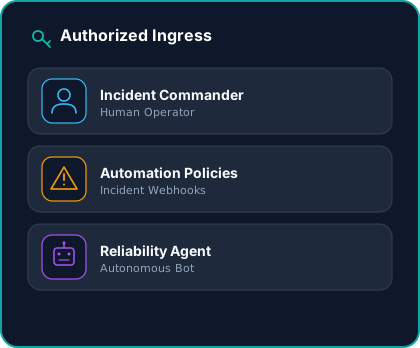
Authorized Ingress: Where Operational Assessment Begins
Operational state does not originate inside an infrastructure vacuum. It begins with an authoritative operational assessment. RuntimeHQ provides authenticated, governed ingress across three distinct operational actors:
1. Incident Commanders (Interactive Triage)
Human responders managing Sev-1 and Sev-2 incidents declare capability condition through the console or CLI under active war room pressure.
2. Automation & Integration Policies (System Webhooks)
Pre-governed alert webhooks from Datadog, PagerDuty, or deployment pipelines declare state automatically via the CreateIncident API when latency or error rates breach SLO thresholds.
3. Autonomous Reliability Agents (AI Runbooks)
Programmatic SRE agents declare capability-level degradation within strictly scoped operational policies and token boundaries.
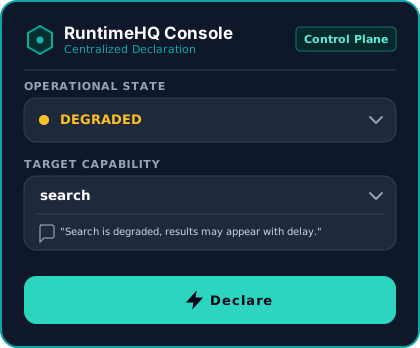
Centralized Declaration: Single Source of Operational State
Once an assessment arrives, state is activated once at the control plane. Teams no longer coordinate outages across scattered Slack channels, fragmented feature flags, or ad-hoc environment variables.
Capability-Level Targeting
Scope declarations to specific functional capabilities (e.g., search) rather than blunt, site-wide panic switches or user cohorts.
Authoritative Operational Messaging
Bind validated customer-facing messages directly to the state transition, ensuring consistent communication across all web, mobile, and partner surfaces.
Zero Application Redeployments
Activate degraded conditions, emergency outages, or scheduled maintenance windows across application estates with bounded propagation latency, without releasing code, restarting server pods, or touching CI/CD pipelines.
Deterministic State Resolution
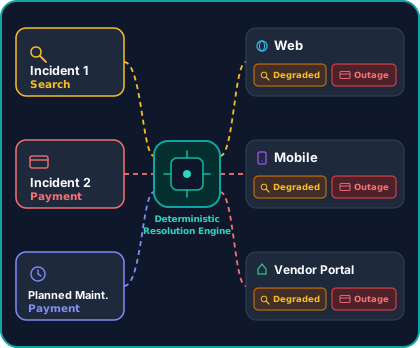
The control engine dynamically computes effective operational state whenever an incident is declared, updated, or a maintenance window is activated. Because operational events frequently overlap—such as an unexpected payment outage colliding with a scheduled maintenance window—RuntimeHQ eliminates last-write-wins race conditions by resolving conflicts deterministically before distributing state across your estate:
Capability-Level Severity Precedence
When multiple events target the same capability, highest severity deterministically wins: OUTAGE (P1) > DEGRADED (P2) > MAINTENANCE (P3) > OPERATIONAL (P4). An active outage always overrides planned work.
The Capability State Matrix
Resolution is calculated once at the control plane across core entities and compiled into an authoritative Capability State Matrix. Consuming applications never independently evaluate complex conflict rules; they receive a single, pre-resolved canonical payload.
Immutable State Versioning
Every resolution cycle increments an immutable state version number and generates a cryptographic audit footprint for post-incident timeline reconstruction and compliance.
Distribution Layer: Complete Decoupling of Control & Runtime
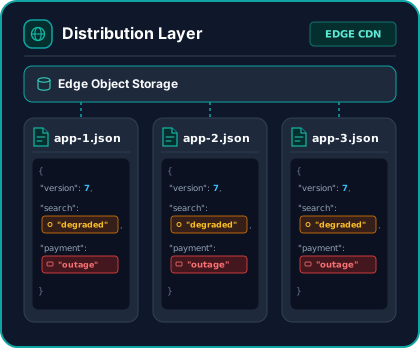
RuntimeHQ strictly separates the control plane from the runtime plane. State delivery uses a decoupled, vendor-agnostic edge distribution architecture designed for extreme availability:
Zero Control Plane Dependency on Runtime Path
If the control plane, management console, or administrative database experiences maintenance or downtime, running applications continue operating with zero degradation.
High-Durability Global Edge Caches
State payloads are published asynchronously out-of-band and fetched via the Edge Runtime API across Anycast edge PoPs worldwide, delivering low-latency edge hits.
Thundering-Herd Protection
An asynchronous pull distribution architecture prevents persistent connection storms and ensures Sev-1 user traffic surges never overwhelm backend control infrastructure.
SDKs With No Critical-Path Dependencies
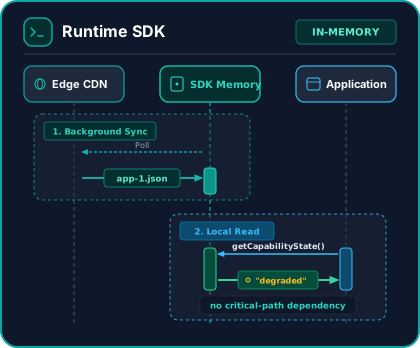
Our native SDKs embed a lightweight in-process memory cache. Synchronizing out-of-band in the background, they inspect state locally with strict architectural guarantees:
No Request-Path Latency
SDK always returns capability health from local memory. This introduces zero network roundtrips to user transactions, database operations, or API gateway routing paths.
Crash-Proof Non-Interference Contract
An internal SDK exception or upstream network failure will never block, intercept, or terminate host application execution. The host runtime always takes precedence.
Deterministic Fallbacks & Partition Immunity
If edge networks or DNS drop offline, SDKs evaluate against last known good in-memory state or preconfigured runtime keys & fail-safe defaults without incident guesswork.
Connected Applications Own the Behavior
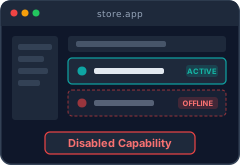
The core category axiom in action: RuntimeHQ communicates the operational condition; applications own their behavior. Every system registered in the Application Registry — from web and native mobile clients to backend services and APIs — executes domain-specific fallbacks tailored to its runtime requirements:
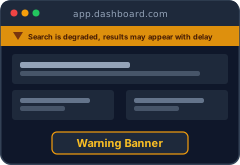
1. Contextual Inline Warning Banners
Render targeted advisory notices at the point of need (e.g. informing users of search delays) without alarming healthy workflows with global panic banners.
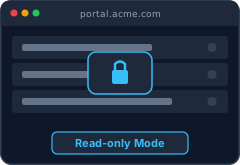
2. Read-Only Safe Mode
Gracefully disable destructive database mutations and forms while keeping read, view, and reporting dashboards completely operational during storage migrations.
3. Capability Circuit Breakers & Service Degradation
Gracefully substitute failing dependencies in frontends or shed non-critical load in backend APIs and background workers instead of allowing downstream timeouts to cascade into system-wide failures.
application owns behavior.
The Operational Timeline: Auditability & COE Readiness
Every declared state transition is cryptographically logged. Generate authoritative operational timeline reconstructions for post-incident reviews, enterprise audits, and Correction of Error (COE) reports.
Active Incident Timeline (Incident #INC-4022)
Append Operational Note
Timeline entries are strict and append-only for SRE auditability. Pinned notes dynamically populate the Correction of Error (COE) report timeline.
Deterministic priority engine resolved: App Checkout Outage state takes precedence over database scheduled maintenance window.
Confirmed payment gateway connection pools exhausted. Third-party provider Stripe resolving their DNS issues.
Attached Checkout and Payments impact scopes to Incident #INC-4022.
Activated OUTAGE state for app Checkout API. Message: "Credit Card processing is experiencing service anomalies. SRE is resolving."
Product Architecture FAQ
Details regarding state precedence, edge caching, SDK non-interference contracts, and fail-safe defaults.
What is an operational state control engine?
How does RuntimeHQ handle conflicting operational states?
Can multiple applications be attached to one state declaration?
Does RuntimeHQ introduce network latency to user requests?
What happens if the control plane or CDN goes offline?
How is RuntimeHQ different from feature flag platforms?
Why not just write a JSON file to S3 or Cloudflare KV?
Does RuntimeHQ inject UI components automatically?
Can RuntimeHQ support isolated staging and production testing?
How does RuntimeHQ support post-incident reviews (COEs)?
Developer & Architecture Documentation
Deep dives into contracts, API specifications, and architectural invariants.
Establish a single source of operational state
Keep customers confident and eliminate fragmented incident response. Declare outages, degraded conditions, and maintenance states once, then coordinate how connected applications respond across your entire estate.
Book a Walkthrough
Discuss your architecture and integration directly with the engineers building RuntimeHQ. No sales reps or qualification decks.
Pick a Time