
Microsoft 365 Outage: Isolating Connector Cascades
Architectural analysis of the Nov 2026 Microsoft 365 outage: how SaaS apps isolate connector cascades with capability-scoped graceful degradation.
In this article
- Mechanics of the November 2026 Microsoft 365 disruption (
EX1550543andMO1550821), distinguishing verified service restoration from residual queue drainage and downstream connector impacts across AI platforms and UK public services. - Data-gravity constraints that prevent transparent multi-cloud failover for authoritative tenant operations, alongside the boundaries of reactive
try/catchhandling and unscoped global banners. - Domain boundaries separating upstream provider status surfaces, feature flags, and incident management tools from machine-readable, capability-scoped Operational State.
- Design patterns for feeding frontend components and background sync workers from a single resolved state artifact across staged operational recovery and bounded local-state freshness.
- Architectural criteria distinguishing multi-surface estates with tenant-bound dependencies from simpler applications served by local error handling or backend failover.
The Bottom Line: Downstream applications generally cannot transparently fail a customer's authoritative Microsoft 365 Exchange, Graph, or SharePoint operations over to another cloud provider because customer data and identity reside inside the upstream tenant. When an upstream disruption like Microsoft 365's November 2026 incident (EX1550543 and MO1550821) combines an acute service outage with staged restoration and residual backlog drainage, applications without dependency-scoped Operational State are caught between alarming unaffected users with global banners or leaving connector users facing opaque timeouts. Centralizing capability-scoped Operational State declaration while decentralizing UI and worker execution allows downstream platforms to adapt impaired integration boundaries while keeping unrelated capabilities operational.
Between November 12 and November 14, 2026, Microsoft 365 experienced a global service disruption across Exchange Online, Outlook, Microsoft Teams, SharePoint Online, OneDrive, Microsoft 365 Copilot, and Microsoft Defender XDR. Because Microsoft closed the active advisories on November 14 with its formal Post-Incident Review (PIR) scheduled for subsequent publication, this incident retrospective examines the verified status disclosures and what the event demonstrates about dependency-scoped operational state.
While the total incident and residual queue-drainage envelope spanned roughly 44 hours from initial onset to final closure (with primary Exchange Online service impact substantially restored after roughly 24 hours), a distinct architectural lesson unfolded one layer downstream. Specific Microsoft 365 connector and email-backed capabilities inside OpenAI ChatGPT, Anthropic Claude, UK police online reporting portals, and NHS.net pharmacy workflows experienced prolonged impairment into November 13, in some cases for more than 24 hours, even while broader services (such as ChatGPT's core interface and UK 999/101 policing channels) continued operating or followed independent operational lifecycles.
That asymmetry raises a core systems design question: when an application depends on a customer's upstream tenant whose authoritative operations cannot be transparently failed over, how should affected capability boundaries, UI surfaces, and background workers behave across active failure and staged backlog recovery without disrupting unaffected workflows?
What Happened During the November 2026 Microsoft 365 Outage (EX1550543 and MO1550821)?
According to updates on the Microsoft Service Health portal under advisories EX1550543 (Exchange Online) and MO1550821 (broader Microsoft 365 suite), alongside public disclosures from Microsoft EVP Charles Lamanna, there was no indication of malicious or cyber activity. Microsoft reported that a latent issue from an earlier network capacity upgrade surfaced following a subsequent network configuration change.
In its status updates, Microsoft reported that servers unexpectedly became unavailable after failing automated health checks, placing additional load on remaining infrastructure. Microsoft's recovery process involved isolating affected infrastructure, rolling out alternate health-check validations, gradually reintroducing traffic while validating stability, and extending Exchange Online message timeout windows to 48 hours while accumulated mail queues drained. Primary consumer and Exchange Online service availability was substantially restored roughly 24 hours after onset (16:10 to 18:00 UTC on November 13), while residual backlog processing continued until final incident closure at 12:04 UTC on November 14. (Note: an earlier Americas-scoped Microsoft Teams chat contention advisory, TM1550488, ran from 14:45 to 15:53 UTC on November 12 and resolved independently prior to this global disruption.)
Architecturally, Microsoft's need for isolated recovery and gradual traffic reintroduction resembles a classic overload recovery loop, in which restoring traffic too aggressively to recovering server pools can recreate the saturation conditions that triggered capacity loss.
External telemetry and downstream status disclosures documented how the upstream outage propagated across dependent capabilities:
- Crowd-Sourced Outage Reports: According to Ookla's Downdetector analysis, crowd-sourced user problem reports (reflecting individual user submissions rather than distinct enterprise tenant counts) surged across 74 countries in the first hour and surpassed 7 million reports by
16:00 UTCon November 13, peaking near 20,000 reports per minute with more than 90 countries or territories logging at least 1,000 reports each. - Transport and HTTP Failure Modes: Network intelligence from ThousandEyes observed global availability degradation accelerating around
17:30 UTCon November 12, with clients encountering connection resets, connection refusals, response timeouts, and HTTP server errors. - Connector-Scoped AI Platform Incidents: Both OpenAI (
01M78GAT3AK9P9W8Z230KHFVE8) and Anthropic (sqn3fg1l96dl) logged incidents titled "Elevated errors affecting the Microsoft 365 connector". OpenAI's status page isolated impact to a single ChatGPT component (Connectors/Apps), while Anthropic documented errors across mail, calendar, and search tools in its Microsoft 365 connector and Claude for Outlook from16:03 UTCon November 12 to16:40 UTCon November 13. Downstream connector failures persisted into November 13, in some cases for more than 24 hours. OpenAI's incident remained scoped toConnectors/Apps; Anthropic separately reported a broader Claude service incident on November 13 (investigated from13:09 UTCand resolved at15:38 UTCacrossclaude.ai, the Claude API, and Claude Code), so the connector incident should not be interpreted as evidence that the entire Claude platform remained continuously unaffected. - Public Policing and Healthcare Services: The UK National Police Chiefs' Council (NPCC) reported that the Microsoft disruption affected some force email systems and online reporting services while essential policing,
999emergency response, and101telephone lines continued operating under contingency arrangements. Similarly, the UK National Pharmacy Association warned of potential prescription delays after community pharmacies lost access toNHS.netemail accounts used to coordinate with GP practices, requiring telephone and manual continuity workflows while core dispensary operations continued.
| Incident Stage | Timestamp (UTC / PST) | Verified Upstream and Downstream Events |
|---|---|---|
| 1. Initial Downstream Impact & Service Degradation | 2026-11-12, 16:03 to 17:30 UTC (08:03 to 09:30 PST) | Anthropic records initial M365 connector errors (16:03 UTC) and Exchange Online mailbox failures begin (~16:17 UTC); Microsoft subsequently reports servers failing automated health checks and dropping from rotation as ThousandEyes observes global resets and timeouts surging around 17:30 UTC (09:30 PST). |
| 2. Official Incident Start & Suite Escalation | 2026-11-12, 17:54 to 19:06 UTC (09:54 to 11:06 PST) | Microsoft acknowledges EX1550543 (17:54 UTC), escalates to suite-wide MO1550821 (18:26 to 18:35 UTC), and halts global configuration changes (19:06 UTC). OpenAI opens ChatGPT Connectors/Apps incident 01M78GAT3AK9P9W8Z230KHFVE8 (18:29 UTC). |
| 3. Primary Service Restoration Milestone | 2026-11-13, 16:10 to 18:00 UTC (08:10 to 10:00 PST) | Microsoft confirms consumer product recovery (16:10 UTC), OpenAI transitions 01M78GAT3AK9P9W8Z230KHFVE8 to monitoring (16:20 UTC), Anthropic's M365 connector error window under sqn3fg1l96dl ends (16:40 UTC, status closed 21:49 UTC), and Microsoft reports broad enterprise workload stability (17:50 to 18:00 UTC) while Exchange mail backlogs continue draining under a 48-hour timeout window. |
| 4. Residual Queue Clear & Final Closure | 2026-11-14, 00:18 to 12:04 UTC (16:18 PST Nov 13 to 04:04 PST Nov 14) | OpenAI marks 01M78GAT3AK9P9W8Z230KHFVE8 resolved (00:18 UTC), and Microsoft's public status surface (status.cloud.microsoft) marks the affected consumer and enterprise services operational (12:04 UTC) after clearing delayed Exchange Online mail queues. |
What is an Ecosystem Connector Cascade?
An Ecosystem Connector Cascade occurs when an upstream dependency failure propagates through one or more tenant-bound integration paths into discrete downstream application capabilities, potentially creating secondary worker contention, retry backlog growth, or multi-step workflow failures while unrelated capabilities in the downstream application remain available. Unlike cloud ingress or management-plane outages in a vendor's own hosting environment, the downstream organization's broader service remains available while specific dependency-backed capabilities degrade or stall.
Figure 1: Illustrative downstream architectural model contrasting tenant-bound connector impairment with out-of-band capability-scoped operational state distribution (an architectural model of dependency coupling, not a reconstruction of internal vendor topology).
Why Can't Downstream SaaS Applications Fail Over Tenant-Bound Connectors or Rely on Global Banners?
Establishing clear architectural boundaries comes first: an Operational State Control Plane would not have prevented Microsoft's internal health-check issues, nor can it replicate an enterprise customer's Exchange mailbox. The engineering problem lies in how downstream applications govern their own dependency boundaries while an upstream tenant is impaired.
Why Does Tenant Data Gravity Prevent Transparent Multi-Cloud Failover?
When a stateless infrastructure provider degrades, backend teams can sometimes shift traffic across alternate providers (for example, routing card payments between processors). Tenant-bound SaaS integrations obey different physics.
Because authoritative documents, calendars, and mail reside inside the customer's upstream tenant, a downstream SaaS vendor generally cannot transparently fail a Microsoft 365 tenant's authoritative Exchange, Graph, or SharePoint operations over to another cloud provider. A downstream product can offer alternative workflows (such as direct file uploads, local cached snapshots, or secondary integrations), and even within a single Microsoft 365 tenant, mail routing, calendar availability, and SharePoint search follow distinct dependency paths and recovery timelines. When those tenant-bound paths share synchronous execution paths with primary workflows, teams encounter in-band third-party SaaS dependency coupling.
Where Do Reactive try/catch Handlers and Unscoped Global Banners Break Down?
For simpler CRUD applications and internal developer utilities, standard try/catch error handling, idempotency keys, and bounded retries are sufficient. Across a prolonged upstream outage and multi-hour backlog recovery on sensitive transactional flows and critical user journeys, however, teams without dependency-scoped state face two flawed defaults:
- Reactive
try/catchTimeouts: Users complete multi-field citizen reports, clinical intake forms, or AI agent prompts only to wait on network timeouts. When upstream Exchange queues experience multi-hour delays, a client timeout leaves the outcome uncertain: the user cannot tell whether submission failed or entered a delayed queue. - Unscoped Global Banners: Global banners are appropriate when an operational impact is genuinely application-wide, such as a scheduled database maintenance window or primary authentication outage. They become counterproductive when an outage affects only a subset of capabilities: displaying a workspace-wide alert banner ("Degraded Performance: Microsoft 365 Integrations Impacted") creates avoidable customer-facing operational noise, causing customers on Google Workspace, Slack, local uploads, or native analytics to assume the entire product is unstable.
Why Do Upstream Recovery Loops Defeat Raw Metric Automation?
During Microsoft's gradual traffic reintroduction on November 12 and 13, upstream endpoints intermittently accepted connections while stability was being validated. Wiring raw HTTP 5xx spikes or timeout counters directly to customer-facing UI banners without persistence windows, deduplication, and recovery hysteresis can cause UI flapping as upstream endpoints fluctuate during staged recovery.
| Application-Wide Alert Noise | Point-of-Need Capability Adaptation |
|---|---|
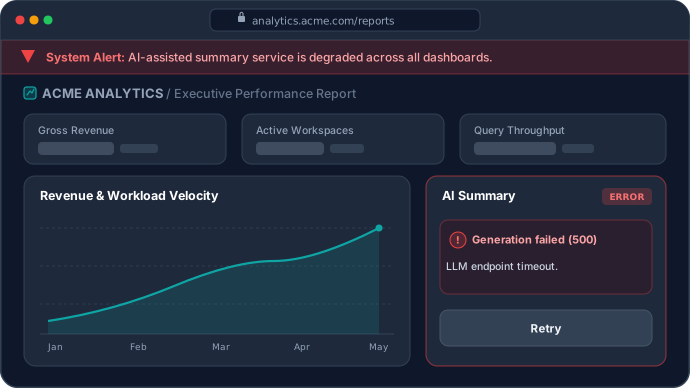 | 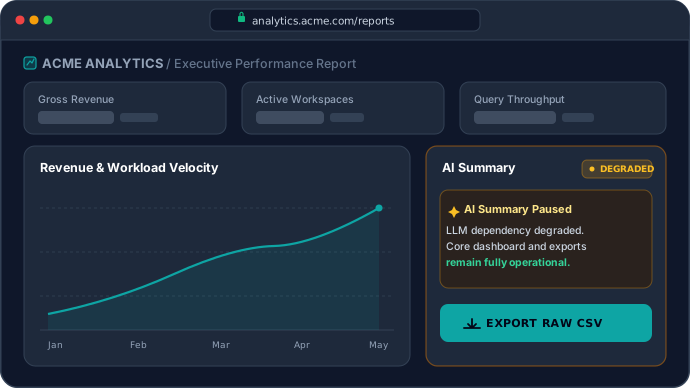 |
| An unscoped top-of-screen alert banner warns every logged-in user of an integration degradation, alarming customers whose core reporting and native workflows remain operational. | The primary workspace stays calm and unobstructed while the discrete impaired capability panel surfaces a localized DEGRADED notice and an active fallback action at the exact point of need. |
Why Don't Upstream Status Feeds or Feature Flags Close the Operational Gap?
When an upstream ecosystem dependency degrades, observability platforms such as Datadog or OpenTelemetry collect, analyze, and surface connector telemetry within minutes. The friction appears in translating those signals into consistent runtime behavior across client interfaces and background workers.
What is the Operational Gap?
The Operational Gap is the architectural divide between detecting an operational event and making that event available as shared, machine-readable Operational State to the applications affected by it. In multi-capability SaaS products, this divide separates internal responder awareness from the UI components and background workers that interact with an impaired connector (explored in The Operational Gap: Why Upstream Outages Create Fragmented Client Experiences).
Existing reliability and delivery tools excel at their intended domains, yet encounter clear boundaries during prolonged connector disruptions and recovery tails:
- Upstream Status Portals and Tenant Advisories: Hosted status APIs (such as
status.openai.com,status.claude.com, or Atlassian Statuspage) are CDN-fronted and expose structured component enums alongside incident arrays. However, Microsoft's detailed tenant-specific Service Health advisories (EX1550543,MO1550821) are exposed through the authenticated Microsoft 365 Admin Center, while its public status surface (status.cloud.microsoft) provides broader service-level status information. Public status feeds also model provider-defined components and service indicators and chronological incident history rather than a consuming app's discrete Application Capabilities (detailed in Status Pages vs. Operational State Control Planes). - Feature Flag Platforms (LaunchDarkly, Unleash, Statsig): Modern platforms support structured JSON variants, permanent kill switches, and single-flag optimistic versioning. Their boundary is domain alignment: feature flags typically control which users or cohorts receive a code path or configuration, whereas Operational State communicates the condition of a capability during an operational event, leaving application policy to determine the response. Without centralized operational precedence, overlapping incidents force client code to reconcile independent flags (analyzed in LaunchDarkly vs. RuntimeHQ: Feature and Operational Control).
- Incident Management Platforms (PagerDuty, Incident.io): Incident management platforms coordinate people and incident workflows across paging, Slack triage channels, and post-incident reviews. By decoupling incident orchestration from application state, they act as the upstream trigger for explicit declarations rather than an edge-cached runtime distribution layer.
| Architectural Layer | Core Question Answered | Primary Strength | Boundary During a Prolonged Connector Disruption |
|---|---|---|---|
| Upstream Status Feeds & Advisories | "What is the public or tenant health of the upstream vendor?" | External stakeholder transparency and chronological incident updates | Public portals provide broad service-level status while detailed tenant advisories require admin auth; models provider components rather than downstream capabilities. |
| Feature Flag Platforms | "Which users or cohorts should receive this code path?" | Progressive delivery, experimentation, and targeted release kill switches | Provides flexible flag evaluation and kill-switch primitives, but operational lifecycle, dependency scope, and cross-condition resolution must be modeled by the consuming application rather than serving as the native domain model. |
| Incident Orchestration Platforms | "Who is on call, and how do we coordinate human responders?" | Alert routing, Slack triage channels, and human workflow coordination | Coordinates people and incident workflows rather than running client apps or worker fleets. |
| Operational State Control Plane | "How should connected capabilities behave right now?" | Centralized declaration, deterministic state resolution, and out-of-band edge sync | Does not detect health or fix code bugs; relies on explicit declarations and pre-engineered local fallbacks. |
How Does an Operational State Control Plane Isolate Connector Cascades Out-of-Band?
Closing the operational gap for third-party integrations requires modeling each external dependency graph (mail dispatch, calendar sync, SharePoint search) as a discrete capability rather than treating application availability as monolithic.
What is Capability-Level Graceful Degradation?
Capability-Level Graceful Degradation is the architectural pattern in which an application selectively restricts, adapts, or routes alternative workflows for discrete functional capabilities (such as integrations.m365-connector or intake.exchange-submission) while keeping unaffected capabilities operational, governed by locally evaluated Runtime State.
An Operational State Control Plane is a centralized architectural layer for declaring, resolving, and distributing Operational State across connected applications and capabilities during outages, degraded service, and maintenance events. Designed to operate independently of application deployment pipelines and outside the critical request path, the category exists independently of any single vendor, with RuntimeHQ serving as one concrete reference implementation across its three-tier system architecture:
- One Resolved State, Distinct Local Behaviors: Authorized operators declare the condition (
OPERATIONAL,DEGRADED,OUTAGE, orMAINTENANCE) and attach an Operational Message. The Operational State Engine performs Deterministic State Resolution (resolving the same set of operational inputs into a predictable effective Operational State for each application and capability under a defined precedence policy such asOUTAGE > DEGRADED > MAINTENANCE > OPERATIONAL). Web UI components, support portals, and background workers consume the exact same resolved state artifact while executing distinct, role-appropriate local behaviors. - Operationally Descriptive Metadata: Within OSCP schemas, any accompanying Runtime Parameters remain operationally descriptive (such as
available_connectors: ["google_workspace", "local_upload"]oralternate_intake_channel: "phone_101") rather than issuing imperative UI directives likedisabled_buttons. - Out-of-Band Edge Distribution Without Request-Path Coupling: To improve the availability of Operational State when primary infrastructure is impaired, resolved state artifacts publish asynchronously to an independent edge distribution layer. Edge polling combines three distinct HTTP mechanisms: fresh edge cache hits (
200 OKwithout origin contact), RFC 9110 conditional revalidation (If-None-Matchreturning header-only304 Not Modified), and RFC 5861 stale serving (stale-while-revalidatealongsidestale-if-error). As examined in Polling vs. SSE for Operational State Distribution, stateless polling reduces the risk of synchronized reconnection spikes during brownouts, making origin load less directly coupled to client concurrency (with load primarily shaped by cache topology, TTLs, revalidation cadence, and cache misses) while providing deterministic state without synchronous application dependencies.
How Should Teams Map Downstream Ecosystem Capabilities Across States?
The playbook matrix below maps four representative capability archetypes across operational states. Signal thresholds for declaring transitions are defined by each organization's operational policies rather than universal latency or error percentages. The responses below are illustrative implementation policies, not universal defaults; each capability should define its own safe fallback and recovery verification criteria:
| Application Capability | Uncoordinated Default Failure | DEGRADED Response (Client & Worker) | OUTAGE Response (Client & Worker) | Staged Recovery Verification |
|---|---|---|---|---|
integrations.m365-connector (AI SharePoint & Mail Search) | Users invoke connector tools and hit multi-second timeouts; OAuth setup flows fail mid-redirect. | Display inline .notice-warning with operational message; keep cached index searchable; pace background delta syncs. | Suspend live M365 tool invocation and new OAuth links; prompt direct file upload or healthy connectors. | Step OUTAGE to DEGRADED first; restore OPERATIONAL after Graph search and token refresh stabilize. |
calendar.exchange-sync (B2B Scheduling & ATS) | Interview or clinic booking forms spin and return generic 500 errors on calendar write. | Warn of Exchange sync delay; capture preferred time slots as uncommitted drafts for confirmation. | Switch booking UI to manual .ics invite download or alternate calendar provider; pause calendar pollers. | Verify queued calendar webhook backlog clears without recurring HTTP 429/503 spikes before restoring OPERATIONAL. |
intake.exchange-submission (Public / Healthcare Form Intake) | Citizens complete multi-field reports that stall or time out on Exchange SMTP/Graph dispatch. | Present processing delay notice; delegate local draft save and display uncertain-outcome guidance on timeout. | Pause Exchange-backed form dispatch; surface verified alternate intake channel (such as 101 telephone routing). | Confirm downstream mail transport queues drain within normal delivery bounds before restoring OPERATIONAL. |
workspace.core-analytics (Native SaaS & Non-M365 Flows) | Unscoped global outage banner alarms healthy Google Workspace, Slack, and native dashboard users. | Remains OPERATIONAL; no global banner noise; native queries and exports run normally. | Remains OPERATIONAL; isolated from M365 capability scope so unaffected tenants work without interruption. | No transition required; continuous isolation preserved throughout the upstream incident lifecycle. |
How Should Frontend Components and Backend Sync Workers Coordinate Across Staged Recovery?
Microsoft's November 12 to 14 status updates showed why upstream recovery is rarely an instantaneous binary flip: primary service availability returned roughly 24 hours after onset through isolated recovery and gradual traffic reintroduction, while residual Exchange Online mail queues drained into November 14 under extended 48-hour message timeouts. That incident trajectory illustrates why downstream applications can benefit from treating capability recovery as a staged transition rather than jumping directly from outage fallback back to unrestricted load.
What is Staged Operational Recovery?
In an Operational State Control Plane, recovery is modeled as an explicit state transition across the four canonical states rather than introducing a fifth "RECOVERING" state. Staged Operational Recovery separates initial upstream service restoration from full downstream normalization through two governed transitions across three operational stages: operators step an impaired capability from OUTAGE to DEGRADED while upstream endpoints stabilize and residual backlogs drain, restoring OPERATIONAL only after explicit human or policy verification confirms steady-state throughput.
Distributed systems research explains why governed recovery transitions matter. In Metastable Failures in Distributed Systems (HotOS '21), Bronson et al. describe how capacity loss can push a system into a metastable failure state where goodput collapses and a sustaining effect driven by work amplification or reduced efficiency prevents recovery even after the initial trigger is removed. Similarly, as Marc Brooker details in the Amazon Builders' Library, retrying against an overloaded dependency increases backend load unless clients apply exponential backoff and jitter to decorrelate traffic.
While Microsoft's gradual traffic reintroduction addressed internal health-check and capacity pressures, downstream applications gain clean coordination when both client UI components and backend sync workers consume the same resolved state artifact (https://edge.theruntimehq.com/v1/{RUNTIME_KEY}.json) and adapt according to their respective roles.
Figure 2: Illustrative downstream Staged Operational Recovery workflow governing capability state transitions across OUTAGE, DEGRADED, and OPERATIONAL while upstream endpoints and residual queues stabilize.
1. Resolved Edge State Artifact and Aggregate vs. Capability Scope
When an authorized operator declares integrations.m365-connector degraded during backlog drainage while unrelated capabilities remain operational, RuntimeHQ publishes a versioned JSON state artifact to the edge:
{
  "runtimeState": {
    "applicationId": "app_019efea9-d16f-79d1-a874-acea1142801a",
    "state": "RUNTIME_STATE_DEGRADED",
    "message": "Microsoft 365 synchronization is experiencing upstream delays.",
    "capabilityStates": [
      {
        "capabilityName": "integrations.m365-connector",
        "state": "RUNTIME_STATE_DEGRADED",
        "message": "SharePoint and Outlook syncs are delayed while Microsoft 365 clears queued traffic. You can upload files directly or save a local draft."
      },
      {
        "capabilityName": "workspace.core-analytics",
        "state": "RUNTIME_STATE_OPERATIONAL",
        "message": "Core workspace analytics operational."
      }
    ],
    "updatedAt": "2026-11-13T17:15:00.000Z",
    "version": "18"
  }
}
Understanding the relationship between top-level state and capabilityStates is essential to avoid recreating the global-banner problem:
- Aggregate Roll-Up (
runtimeState.stateviauseRuntimeHQ()): Under RuntimeHQ's resolution rules, the aggregate applicationstaterecords the highest resolved condition present within the application's declared state (RUNTIME_STATE_DEGRADEDabove). That roll-up exists as a summary signal for unobtrusive footer or header status dots, internal operations dashboards, or simple single-surface apps before capabilities are decomposed. - Authoritative Capability Scope (
capabilityStatesviauseCapability()): Once an application models third-party integrations as discrete capabilities,capabilityStatesbecomes the authoritative scope for customer-facing UI and worker behavior. Rather than rendering a full-width workspace alert whenever aggregatestateis non-operational, applications reserve global banners for whole-application declarations and bind integration surfaces directly touseCapability("integrations.m365-connector")soworkspace.core-analyticsand unrelated flows remain unaffected.
2. Frontend Point-of-Need Guard (@theruntimehq/react)
Using the headless RuntimeHQ React SDK, components synchronize state asynchronously in the background and evaluate capability posture via local in-memory evaluation. The component below differentiates isOutage from isDegraded. Calling onSaveConnectorDraft delegates draft persistence to a host-provided function; storage durability and security depend on that implementation, and saving a draft does not queue automatic deferred execution without explicit user re-submission:
import React, { useState } from "react";
import { useCapability } from "@theruntimehq/react";

interface M365ConnectorPanelProps {
  onRunSharePointSync: (query: string) => Promise<void>;
  onSaveConnectorDraft: (query: string) => Promise<void>;
  onSwitchToLocalUpload: () => void;
}

export function M365ConnectorPanel({
  onRunSharePointSync,
  onSaveConnectorDraft,
  onSwitchToLocalUpload,
}: M365ConnectorPanelProps) {
  const [query, setQuery] = useState("");
  const [feedback, setFeedback] = useState<string | null>(null);

  // Synchronous local memory read; no network call in the user interaction path
  const { isDegraded, isOutage, message, loading } = useCapability(
    "integrations.m365-connector"
  );

  // Hold failure-sensitive submissions until initial background sync resolves
  if (loading) {
    return <div className="connector-panel">Checking connector status...</div>;
  }

  if (isOutage) {
    return (
      <div className="connector-panel">
        <div className="notice-error">
          {message || "Microsoft 365 connector temporarily unavailable."}
        </div>
        <button
          type="button"
          onClick={onSwitchToLocalUpload}
          className="btn-secondary"
        >
          Upload Document Directly
        </button>
      </div>
    );
  }

  const handleSubmit = async (e: React.FormEvent) => {
    e.preventDefault();
    setFeedback(null);
    try {
      if (isDegraded) {
        // Delegate uncommitted draft save to host app rather than auto-queuing execution
        await onSaveConnectorDraft(query);
        setFeedback(
          "Search saved as a draft. Review and run it after Microsoft 365 sync stabilizes."
        );
        return;
      }
      await onRunSharePointSync(query);
      setFeedback("SharePoint query completed.");
    } catch {
      setFeedback(
        "We couldn't confirm whether Microsoft 365 processed this request. Check your synced workspace activity before trying again."
      );
    }
  };

  return (
    <form onSubmit={handleSubmit} className="connector-panel">
      {isDegraded && <p className="notice-warning">{message}</p>}
      {feedback && <p className="connector-feedback">{feedback}</p>}
      <input
        type="text"
        value={query}
        onChange={(e) => setQuery(e.target.value)}
        placeholder="Search connected SharePoint and Outlook items..."
        required
      />
      <div className="connector-actions">
        <button type="submit" className="btn-primary">
          {isDegraded ? "Save Query Draft" : "Search Microsoft 365"}
        </button>
        {isDegraded && (
          <button
            type="button"
            onClick={onSwitchToLocalUpload}
            className="btn-secondary"
          >
            Upload File Directly
          </button>
        )}
      </div>
    </form>
  );
}
Note two SDK contract boundaries:
- Fail-Open Pre-Sync Default: Prior to initial synchronization or during prolonged edge unreachability,
useCapabilitydefaults to fail-safe operational behavior (isOperational: true,isDegraded: false,isOutage: false,loading: true) so control-plane connectivity issues do not break host rendering. Sensitive flows can inspectloadingto defer submission until initial sync completes, and teams can rehearsal-test both states beforehand via Non-Production Simulation using anrt_test_*key. - Presentation vs. Backend Enforcement: Disabling or adapting a React form guides users and reduces avoidable submissions from that component, but it is not an authoritative backend boundary.
3. Independent Backend Sync Worker Check with Explicit Freshness Bounds
Backend webhook consumers and scheduled Graph crawlers should independently synchronize the same resolved artifact over the Edge Runtime API using conditional If-None-Match headers so background workers pause non-urgent tenant polling during OUTAGE and apply jittered pacing during DEGRADED staged recovery (reducing avoidable upstream connector traffic as a secondary technical effect alongside server-side admission control).
Unlike browser rendering where fail-open defaults prevent UI lockups, a background crawler must distinguish never synchronized, freshly verified, and stale beyond acceptable age. An HTTP 304 Not Modified response confirms only that the cached representation remains current relative to the edge ETag validator (whose origin freshness is governed by edge max-age and stale-if-error bounds, as analyzed in Polling vs. SSE for Operational State Distribution). Combining conditional validation with an explicit hasSynced flag and a capability-appropriate maximum local-state age (MAX_STALE_AGE_MS measured from lastSuccessfulFetchAt, matching the freshness model in @theruntimehq/react) prevents an unsynchronized or disconnected worker from silently assuming OPERATIONAL indefinitely. Here, lastSuccessfulFetchAt means successful validation against the RuntimeHQ edge representation, not necessarily a fresh origin revalidation:
const MAX_STALE_AGE_MS = 5 * 60 * 1000; // Application-defined 5-minute max local-state age

interface WorkerPostureCache {
  state: string;
  etag: string | null;
  lastSuccessfulFetchAt: number | null;
  hasSynced: boolean;
}

const posture: WorkerPostureCache = {
  state: "RUNTIME_STATE_OPERATIONAL",
  etag: null,
  lastSuccessfulFetchAt: null,
  hasSynced: false,
};

function resolveFallbackPosture(now: number): string {
  // Cold start or expired local state: step down to conservative DEGRADED pacing
  if (!posture.hasSynced || posture.lastSuccessfulFetchAt === null) {
    return "RUNTIME_STATE_DEGRADED";
  }
  if (now - posture.lastSuccessfulFetchAt > MAX_STALE_AGE_MS) {
    return "RUNTIME_STATE_DEGRADED";
  }
  return posture.state;
}

export async function refreshM365WorkerPosture(runtimeKey: string): Promise<string> {
  try {
    const res = await fetch(`https://edge.theruntimehq.com/v1/${runtimeKey}.json`, {
      headers: posture.etag ? { "If-None-Match": posture.etag } : {},
    });

    if (res.status === 304 && posture.hasSynced) {
      posture.lastSuccessfulFetchAt = Date.now();
      return posture.state;
    }
    if (!res.ok) return resolveFallbackPosture(Date.now());

    const body = await res.json();
    const cap = body?.runtimeState?.capabilityStates?.find(
      (c: { capabilityName?: string }) => c.capabilityName === "integrations.m365-connector"
    );
    posture.etag = res.headers.get("etag");
    posture.state = cap?.state ?? "RUNTIME_STATE_OPERATIONAL";
    posture.lastSuccessfulFetchAt = Date.now();
    posture.hasSynced = true;
    return posture.state;
  } catch {
    return resolveFallbackPosture(Date.now());
  }
}
What Core Architectural Principles Govern Third-Party Connector Resilience?
Designing multi-tenant SaaS and AI platforms that remain calm during prolonged ecosystem disruptions rests on five architectural principles:
- Model Capability Dependency Boundaries, Not Just Application Boundaries: Microsoft 365 email dispatch, calendar sync, SharePoint search, local analytics, and direct file uploads sit on distinct dependency graphs. Align Operational State scopes to those capability dependency boundaries rather than collapsing third-party tenant impairments into a monolithic application status.
- Drive Distinct UI and Worker Behaviors from One Resolved State Artifact: Declare capability condition and authorized Operational Messages centrally while letting React components, API gateways, and background sync workers consume the same resolved artifact to execute role-appropriate local adaptations.
- Keep Operational State Synchronization Outside the Critical Request Path: Synchronize resolved state artifacts asynchronously over edge caches and evaluate Runtime State from local process memory without adding synchronous network hops to user interactions.
- Gate Transitions on Explicit Declarations and Staged Recovery: Govern capability transitions through explicit operational-state declarations and verified
OUTAGEtoDEGRADEDtoOPERATIONALrecovery stages rather than coupling UI banners directly to fluctuating HTTP 5xx rates. - Define Explicit Cold-Start, Staleness, and Server-Side Enforcement Policies: Pair client-side presentation hooks (
useCapability) with independent backend worker enforcement that bounds maximum acceptable local-state age.
RuntimeHQ was designed around these principles.
When Do You Need This?
Use the following diagnostic criteria (or run the interactive Estate Complexity Assessment) to evaluate whether your application estate warrants decoupling Operational State into a dedicated control plane:
- Tenant-Bound Ecosystem Integrations: Your SaaS or AI product embeds customer-owned third-party platforms (Microsoft 365, Google Workspace, Salesforce, EHR systems, or commerce storefronts) where upstream disruptions impair discrete connectors while unrelated capabilities remain available.
- Sensitive Multi-Step User Journeys: You operate intake portals, scheduling flows, financial workflows, or marketplace plugins where post-submission timeouts erode customer trust or trigger support ticket surges.
- Multi-Surface and Worker Coordination: Web interfaces, embedded add-ins, internal support tools, and background sync workers all need consistent capability state and pre-approved customer messaging from a single resolved state artifact without emergency code deployments.
- Prolonged Upstream Queue and Recovery Cycles: Your integrations interact with stateful mail, calendar, or webhook pipelines that benefit from governed staged recovery while upstream backlogs drain.
- Long-Interval Readiness: Degradation paths may sit unused for months between third-party disruptions and must remain testable (for example, through non-production simulation rehearsals) despite credential expiry, configuration drift, CORS changes, or schema evolution.
When Do Simpler Approaches Suffice?
A dedicated Operational State Control Plane is not necessary for every system. For simpler estates, local error handling or building an in-house operational state engine can remain straightforward to maintain:
| Application Estate Profile | Recommended Approach | Architectural Rationale |
|---|---|---|
| Internal CRUD and Developer Tools | Standard try/catch, idempotency keys, and bounded retries | Technical internal users tolerate transient error toasts without workflow abandonment or marketplace reputation risk. |
| Redundant Stateless Gateways | Automated backend multi-provider failover | Stateless processors may be able to reroute behind the scenes when an equivalent provider and synchronized state are available. |
| Single-Surface App with Rare Maintenance | Static edge configuration file or lightweight in-house script | Low operational concurrency and a single UI surface carry minimal cross-client schema or conflict-resolution overhead. |
| Multi-Surface SaaS with Tenant-Bound Connectors | Dedicated Operational State Control Plane | Tenant-bound authoritative state generally prevents transparent cloud failover; the estate instead benefits from dependency-scoped capability isolation, safe draft delegation, and staged worker recovery. |
Conclusion: When Do You Need an Operational State Control Plane?
Microsoft 365's November 2026 disruption (EX1550543 and MO1550821) demonstrated what upstream ecosystem failures reveal about dependency-scoped operational state. When a tenant-bound ecosystem provider experiences a prolonged outage followed by staged restoration and residual backlog drainage, downstream platforms generally cannot transparently fail authoritative customer mail, calendars, and document repositories over to another cloud; they can, however, govern how each affected capability boundary behaves while keeping unrelated capabilities operational.
Observability systems detect connector errors, incident management platforms mobilize responders, and status pages inform external audiences. An Operational State Control Plane complements those layers by distributing a single resolved, capability-scoped state artifact out-of-band so unaffected workflows continue normally while impaired connector boundaries adapt cleanly across both UI components and background workers. RuntimeHQ implements this architectural model, allowing engineering teams to reserve root-level banners (useRuntimeHQ) for genuine whole-application events while binding third-party connectors and sensitive workflows directly to capability-scoped state (useCapability) without redeploying code.
Key Takeaways
- Model Dependency Scope, Not Monolithic App Health: Because authoritative Microsoft 365 tenant operations generally cannot be transparently failed over across clouds, isolate
integrations.m365-connectorfrom unrelated capabilities rather than triggering workspace-wide alert noise. - Coordinate UI and Workers from One Resolved Artifact: Feed point-of-need React guards and background Graph/Exchange workers from the same resolved state snapshot so presentation guidance and server-side pacing stay aligned.
- Govern Recovery Tails Through Staged Transitions: Step impaired capabilities from
OUTAGEtoDEGRADEDwith paced worker syncs while upstream endpoints and residual mail queues stabilize before restoringOPERATIONAL. - Bound Local-State Freshness Off the Request Path: Combine edge-cached HTTP polling (
200 OK,304 Not Modified, and RFC 5861stale-while-revalidate) with explicit cold-start and maximum local-state age policies in background workers.
To evaluate how capability-scoped operational state fits your integration architecture, Book a Walkthrough with our engineering team or Explore SDK Docs to inspect the headless React contract directly.
Get Your Instant Sandbox Key
Deploy out-of-band operational state controls across your connected applications in 5 minutes. First 6 months free for up to 3 applications.
No credit card required upfront · Instant test key
Managing a multi-app enterprise estate, BYOB storage, or custom SLAs? Talk to an Enterprise Architect →